30 seconds, 16:9, 1080p with sound, made with Seedance 2.5.Open on YouTube ↗
- Models
- Soul 2.0, Nano Banana 2 and Pro, GPT Image 2.5, Seedance 2.5
- Final render
- 480 credits
- Draft render
- 90 credits at 480p
Lock the face
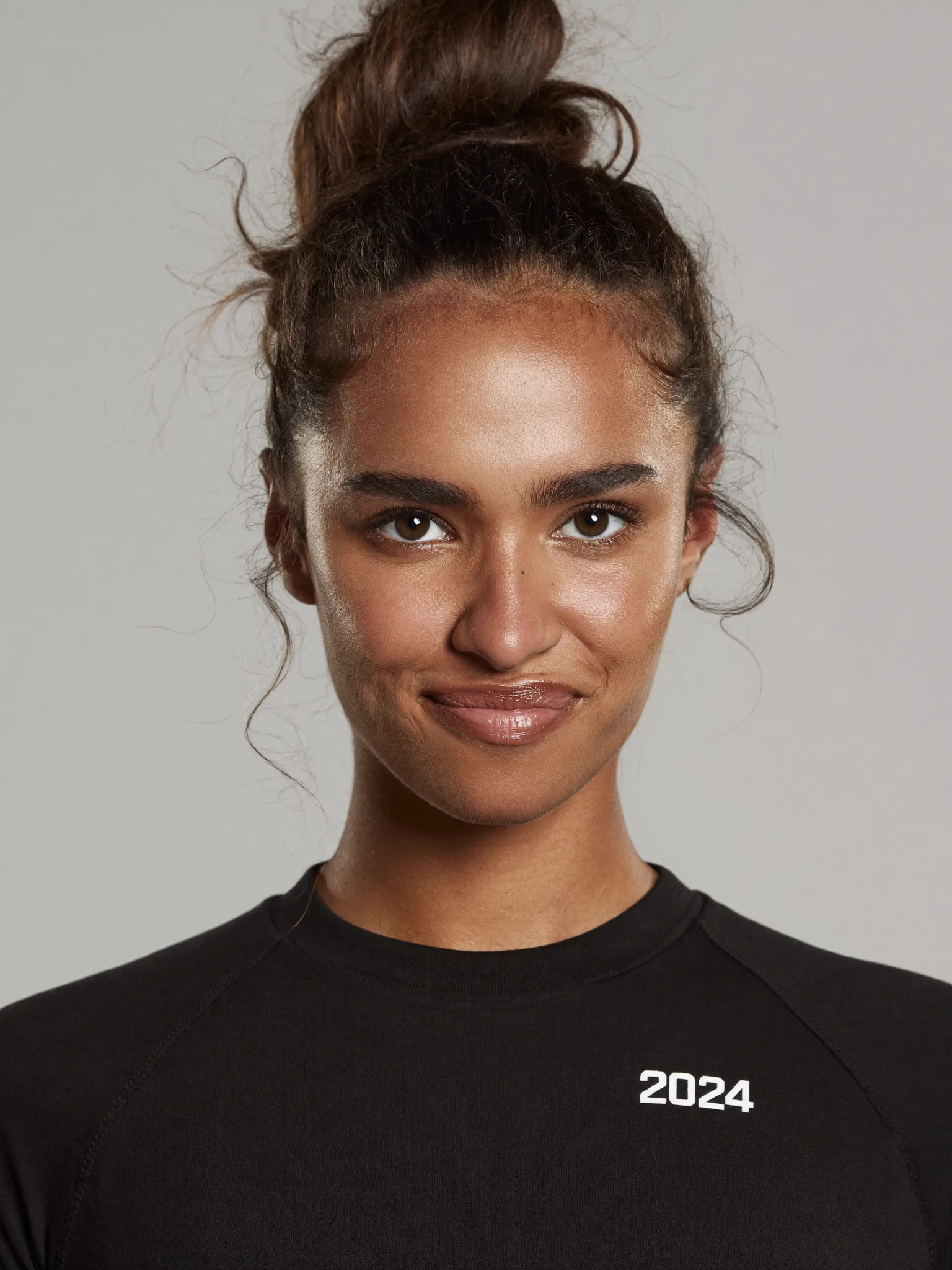
Soul 2.0Generate six face references and pick one. Save it as a named element, @AnnaFace.
Generate 6 single face-reference portraits of a young adult woman with a 2026 athletic face. Brunette, like she is straight off an Olympic Games team. Shot on a professional camera from 2026, with proper lighting so the face is clearly visible.
Build the outfit from a real photo
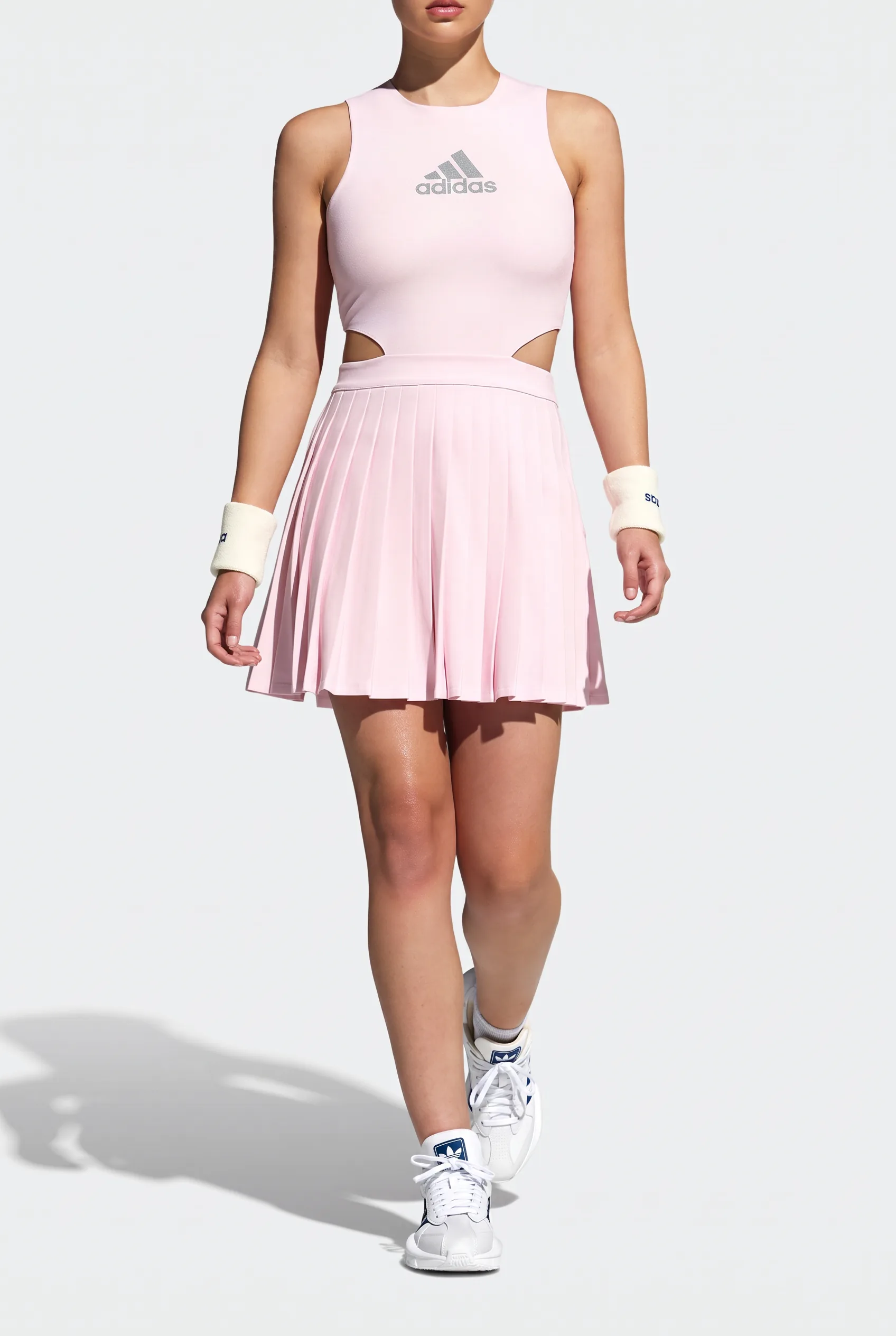
Soul 2.0 + Nano Banana 2Attach a photo of the real garment so the logo and cut survive. Then fix small things with an edit instead of regenerating. Saved as @AnnaOutfit.
Generate an outfit reference for a pro padel player. Use the attached images as your reference while creating her outfit. Show the outfit from shoulders to feet against a plain wall. Warm colors, sport photography, a little film grain. No bag or props. Make sure to keep the adidas logo.
Keep everything as is but make the adidas logo on her chest a little bit smaller. Right now it is too big.
Make the character sheet
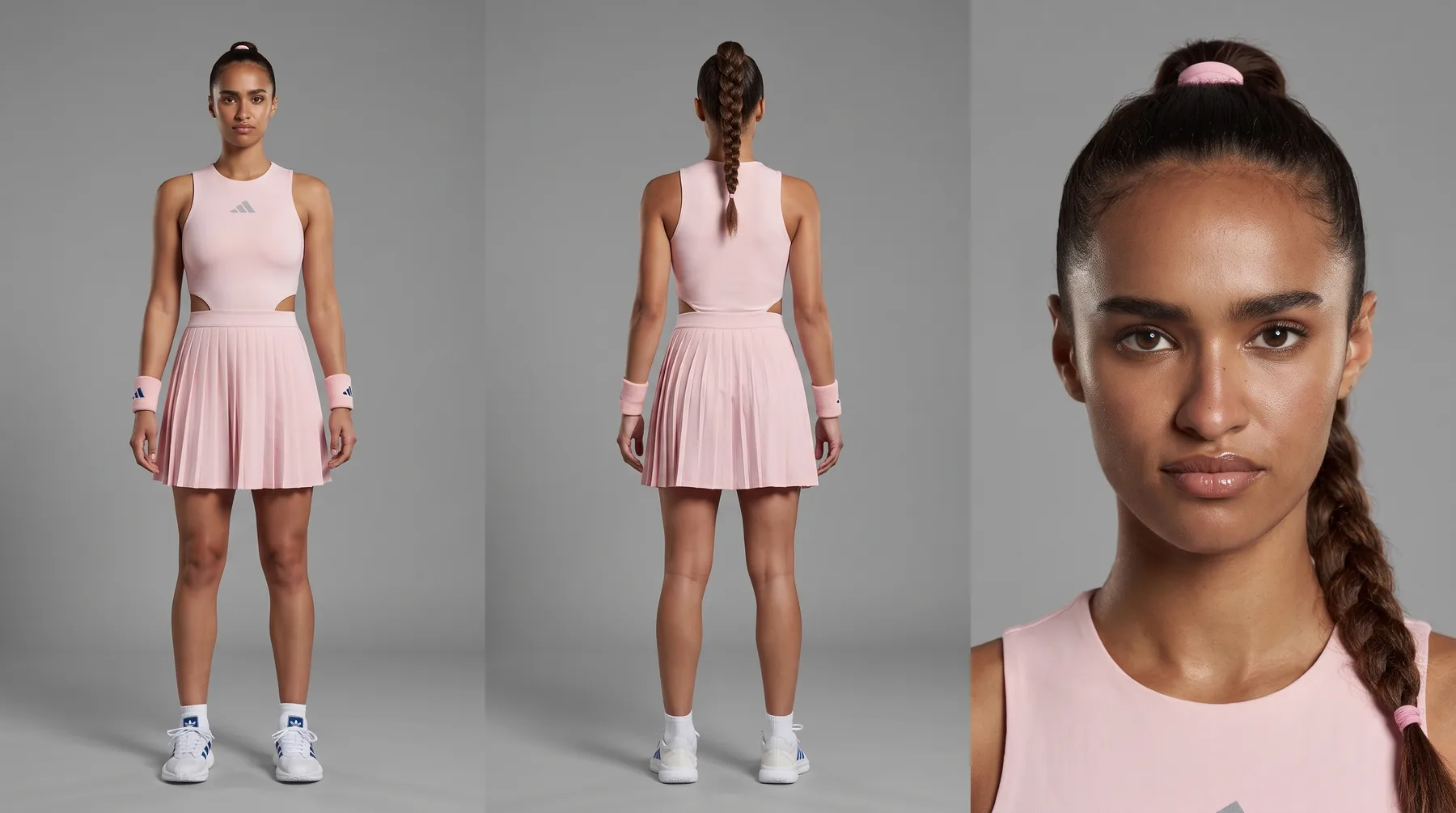
Nano Banana ProOne image with the front, the back and a portrait gives the video model the whole character. Saved as @Anna.
Make a character sheet for Anna. Take her exact face, hair color and hair texture from @AnnaFace, but restyle her hair into a sporty style for competition. Take the clothing from @AnnaOutfit. Height 170 cm. Three panels: full-body front view, full-body back view, and a head-and-shoulders portrait. Neutral grey backdrop, neutral standing pose, empty hands. Keep the logos and all details from @AnnaOutfit. The front view does not need a visible face. The portrait panel must show her face.
Make the product sheet
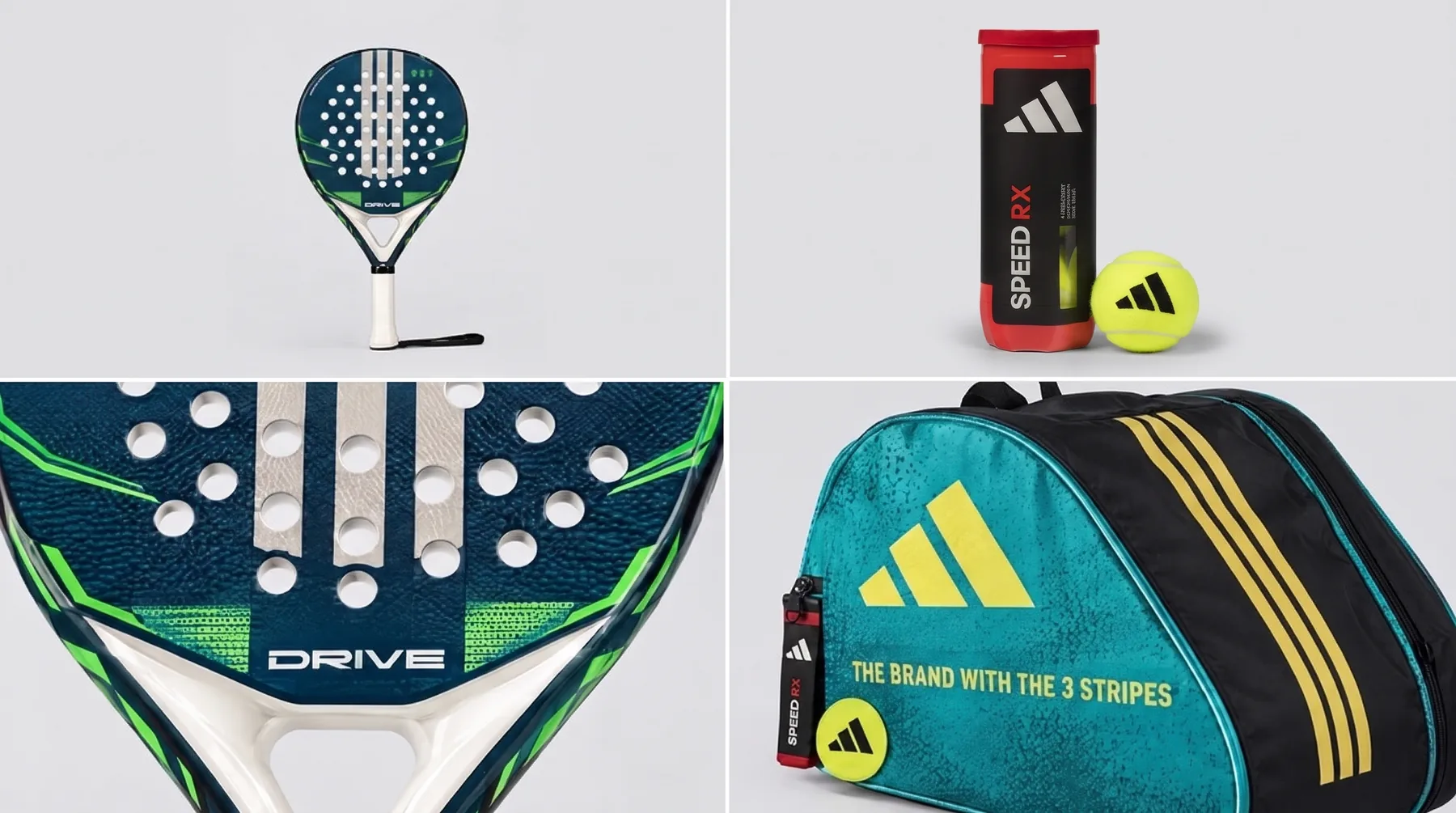
GPT Image 2.5 + Nano Banana 2Racket, ball, ball tube and bag must look identical in every shot. Generate one sheet from the product photo, then edit out what you do not need. Saved as @prop_product.
Use the attached reference image to create a product / prop sheet: clean views of each item on a neutral background, brand marks kept exactly as in the reference.
We have 2 views of the padel racket, which is too much. Keep the top left and, instead of the top right image, show the adidas tennis ball and its package from the earlier reference image.
Pick the court
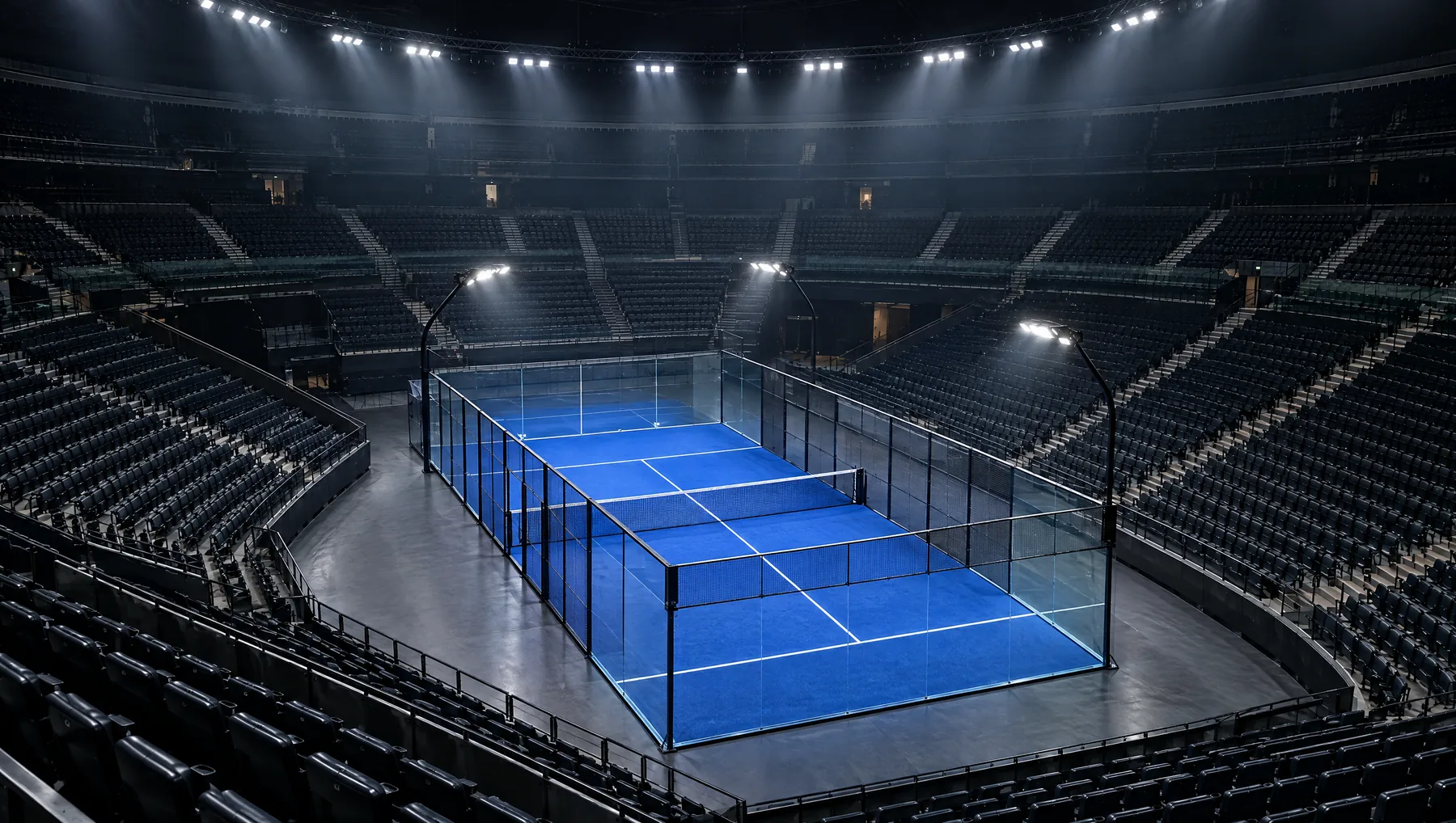
GPT Image 2.5Generate six courts, choose one, fix the floor color, then make a 3/4 view and an environment sheet. Saved as @env_padelCourt.
Create 6 different professional padel courts.
Keep everything as is, but change the color of the ground to the standard padel blue. Show me 3 different images of that version.
Using the second image, create a 3/4 view of this padel court and also create an environment sheet of it.
Write the brief
ClaudeDescribe the idea in plain words. The brief fixes the story and the timing before any shot is written.
30-second hyper-dynamic adidas padel commercial.
Hook: Anna's shot hits the camera lens of the opponent's POV and cracks it.
Flashback: a tape rewind effect, back to the start of the session.
Unpack: she opens her bag and takes out the racket and the adidas ball tube and ball.
Underhand serve, diagonally across the net, with a slow-motion ball bounce that shows the logo.
Rally from the opponent's POV: vibora, kick smash, lob, volley, backhand off the glass.
Final overhead smash in slow motion from three or four angles.
The ball hits the lens, the glass breaks, and the adidas title card appears.
Hyper-dynamic cuts. Grungy adidas look, print-film color, 35 mm grain. Sound effects and music with a competitive feel.
Turn the brief into one video prompt
Seedance 2.5 + the prompt-writer skillOne prompt, 25 timed shots, 30 seconds. Every shot has a start time, a size and a field of view. Attach four images (character sheet, outfit, props, court) as @image1 to @image4. Seedance 2.5 does not take named elements, so map each image to its name in the references block.
Show the full 30-second prompt
SCENE CONTEXT
A 30-second hyper-dynamic adidas padel commercial on a blue stadium padel court. The opponent's POV camera is hit in the lens by Anna's shot, the film rewinds to the start of the session, follows Anna from unpacking her bag to a rally that ends in a smash, and closes with the same lens hit and an adidas title card. Anna is the only person visible; the opponent exists only as his POV.

ACTIVE REFERENCES
@Anna: young adult woman, elite padel athlete, athletic 170 cm build, braided high competition ponytail, warm mid-range voice that turns quick and slightly breathless when worried. 100% matches the reference.
@annaoutfit: blush-pink sleeveless padel dress with a side waist cut-out and gathered bubble-hem skirt, matching blush-pink wristbands, white court shoes with grey stripes; small grey adidas logo clearly visible on the chest. 100% matches the reference.
@prop_product: padel racket, adidas padel ball with the adidas logo readable on it, the adidas ball tube, and the padel bag. 100% matches the reference.
@env_padelCourt: stadium padel court with standard blue turf, white lines, tall glass walls, central net, tiered empty stands, ring of white spotlights overhead. 100% matches the reference.

LOCATION MAP
Foreground: glass wall panels and net tape. Midground: the blue court with Anna. Background: tiered empty stands curving into darkness under the ring of spotlights. The opponent's camera stands on the near half of the court, 8 meters from Anna, on the court axis, facing the net. Anna works the far half, moving along the baseline and toward the net. The ball travels along the court diagonals.

FIRST FRAME / BLOCKING
Frame one is already moving: the handheld camera at chest height faces the net, the blue court and glass wall fill the frame, and Anna stands at the right edge of frame in a ready stance, racket back, a ball bouncing up into her hitting zone.

FORMAT MODE
Timed multishot, 30.0 seconds, 25 shots, HARD CUTs at the stated seconds. Shot 2 is one continuous take. Cuts only at the specified points, the camera does not cut on its own. Real time in every shot except the slow-motion shots at 25% speed; hard cuts only between speed modes.

OPTICS
Rectilinear lenses with natural perspective: wide framings stretch the near foreground, tight framings compress the spotlights into the background. Motion blur in real-time shots, crisp detail in slow motion. Each shot states its shot size and FOV, no drift mid-segment.

CAMERA
Body-mounted and handheld operator camera with heavy motion from the opponent's body: shake amplitude 2 cm at the start growing to 6 cm across the rally. Cutaway cameras are handheld with 1 to 2 cm tremor. The camera sits on the shadow side of the key light, operator axis along the court length. Tonal character: wide latitude, warm highlight roll-off, deep blacks.

ACTION
0.0s to 1.4s — SHOT 1, WS 84°, handheld POV at chest height, real time. The camera whips right, 90 degrees in 0.7 seconds, and settles on @Anna at 0.8s. She swings the @prop_product racket in a forehand drive; the ball leaves the strings at 1.1s at 90 km/h straight at the lens and fills the frame by 1.4s.
1.4s SMASH CUT
1.4s to 5.5s — SHOT 2, 63° throughout, one continuous take, real time. The ball hits the lens at 1.4s and a web of cracks radiates across the glass. The camera tumbles backward, the court and glass wall spin through the frame for 0.6 seconds, and it lands on the turf at 2.0s facing the ceiling: the ring of white spotlights glows through the cracked lens, the camera lies still, the cameraman's breath is audible. At 3.3s @Anna steps into frame from the right and leans over the camera, her face close to the cracked lens, brows lifted, eyes scanning. At 3.6s she says: "I'm so sorry, are you OK?" The line ends at 5.3s.
5.5s HARD CUT
5.5s to 6.5s — SHOT 3, 63°, tape fast-rewind effect: the footage runs in reverse at 8x speed with horizontal tracking lines, horizontal jitter and color bleed, the hook action unwinding and settling on the empty @env_padelCourt at the start of the session.
6.5s HARD CUT
6.5s to 7.3s — SHOT 4, WS 84°, low-angle handheld, real time. @Anna walks through the glass court door onto the @env_padelCourt at 6 km/h with the @prop_product bag on her shoulder, spotlights flaring above her.
7.3s HARD CUT
7.3s to 8.0s — SHOT 5, MCU 29°, real time. The @prop_product bag drops onto the turf; her hand pulls the zipper open at 12 km/h and draws out the @prop_product racket.
8.0s HARD CUT
8.0s to 8.8s — SHOT 6, ECU 12°, real time. Her fingers lift the @prop_product adidas ball tube out of the bag, the adidas logo on the tube facing the lens.
8.8s HARD CUT
8.8s to 9.6s — SHOT 7, MCU 29°, real time. She twists the lid of the tube; it opens with a pressurized hiss and pop.
9.6s HARD CUT
9.6s to 10.5s — SHOT 8, CU 18°, real time. She pulls out one @prop_product ball and rolls it in her palm, the adidas logo turning toward the lens.
10.5s HARD CUT
10.5s to 11.1s — SHOT 9, WS 47°, low-angle tracking from shoulders down, real time. @annaoutfit at the baseline: she squares up to serve, feet shoulder-width apart, the bubble hem settling, the chest adidas logo catching the spotlight.
11.1s HARD CUT
11.1s to 11.6s — SHOT 10, ECU 12°, real time. The @prop_product racket head and grip held at waist height by her hand in the @annaoutfit wristband.
11.6s HARD CUT
11.6s to 12.2s — SHOT 11, ECU 12°, real time. The @prop_product ball held at her hip between fingertips, adidas logo facing the lens.
12.2s HARD CUT
12.2s to 13.4s — SHOT 12, ECU 12°, ground level, SLOW MOTION at 25% speed. The @prop_product ball drops from her fingers onto the blue turf of @env_padelCourt, compresses on impact, sand infill puffs off the turf, and the ball rises with the adidas logo rotating, sharp and readable.
13.4s HARD CUT
13.4s to 14.2s — SHOT 13, WS 47°, side view, real time. @Anna serves underhand: the ball bounces, she strikes it at waist height, and it travels diagonally across the net at 70 km/h into the far service box.
14.2s HARD CUT
14.2s to 15.0s — SHOT 14, WS 84°, opponent's body-mounted POV, real time. The serve bounces in from the diagonal, the camera lurches sideways and steps back, the racket tip of the opponent enters at the bottom edge of the frame as the ball flies past.
15.0s HARD CUT
15.0s to 17.0s — SHOT 15, WS 63°, side-on at net-post height, real time. A vibora: @Anna hits an overhead slice with a lateral cut at 110 km/h, the ball stays low with side spin.
17.0s HARD CUT
17.0s to 18.9s — SHOT 16, MS 29°, low angle from the turf behind her, real time. A kick smash: she jumps and hits a spin smash at 120 km/h; the ball bounces and kicks sideways off the turf.
18.9s HARD CUT
18.9s to 20.7s — SHOT 17, WS 84°, opponent's POV, real time. A lob: she lifts a 50 km/h lob that climbs into the ring of spotlights; the camera tilts up and follows the ball through the haze.
20.7s HARD CUT
20.7s to 22.4s — SHOT 18, MCU 29°, at the net, real time. A volley: a compact block with no backswing, the ball punching back at 80 km/h.
22.4s HARD CUT
22.4s to 24.0s — SHOT 19, WS 47°, camera behind the back glass, real time. The ball slams the back glass, the panel flexes and thuds, and the ball rebounds; @Anna turns and returns it with a backhand.
24.0s HARD CUT
24.0s to 24.7s — SHOT 20, MS 29°, low angle from the turf looking up, SLOW MOTION at 25% speed. @Anna jumps, racket cocked behind her head for the overhead smash.
24.7s HARD CUT
24.7s to 25.4s — SHOT 21, MS 47°, side-profile tracking, SLOW MOTION at 25% speed. At the apex her racket arm extends to the ball, wristband and chest adidas logo in sharp detail.
25.4s HARD CUT
25.4s to 26.1s — SHOT 22, WS 63°, through the glass, SLOW MOTION at 25% speed. The whole court: the smashed ball streaks across the net, sand puffs rising from the turf.
26.1s HARD CUT
26.1s to 26.8s — SHOT 23, ECU 12°, SLOW MOTION at 25% speed. The racket strings meet the ball, the strings deform, the adidas logo on the ball stays sharp.
26.8s HARD CUT
26.8s to 28.0s — SHOT 24, WS 84°, opponent's body-mounted POV, real time. The camera shakes as the smash travels at 140 km/h toward the lens, fills the frame and hits the lens at 27.9s; the glass shatters.
28.0s SMASH CUT
28.0s to 30.0s — SHOT 25, locked static title card. A black frame; the adidas logo (three slanted parallel stripes forming a mountain-shaped mark) above the word adidas in lowercase bold white letters, with a web of broken glass cracks spread across the whole frame.

PERFORMANCE
@Anna: in the hook, relaxed focus before the strike; after the hit her brows lift, her eyes scan the lens, her lips part and she leans in with audible breath. In the rally her jaw is set, her eyes lock on the ball, she exhales sharply at each contact, and a light sweat sheen on her collarbones builds shot by shot. Pore-level skin detail, living eyes with catch-lights.

PHYSICS
The crack web spreads from the impact point across the lens glass in 0.3 seconds. The ball bounces with real mass on the turf and throws sand infill. The back glass flexes and thuds on each ball strike. The racket strings deform at contact. The bubble hem and wristbands move with inertia.

LIGHTING
A ring of white spotlights overhead is the key, 5600K, with fill from light bouncing off the glass. Haze density 25%, visible at 15 meters, spotlight beams visible in the haze. The stands stay in shadow. The light rhythm holds identical across every cut. The title card carries soft white backlight shining through the cracks over black.

COLOR GRADE
Grungy adidas grade with print-film character: crushed deep blacks, rich contrast, warm highlight roll-off, slightly muted color. The deep blue turf frames the blush-pink dress catching the cool white spotlight spill. Slight halation around the spotlights and a dirty vignette.

AUDIO
Music is silent from 0.0s to 5.5s: court ambience, the ball strike at 1.1s, the lens crack and body thud at 1.4s, a muffled ring and the cameraman's breathing, then Anna's line from 3.6s to 5.3s: "I'm so sorry, are you OK?" in her own voice. A tape rewind scrub runs from 5.5s to 6.5s, and at 6.5s a driving percussive electronic pulse enters, every cut landing on the beat; bag zip, tube hiss and ball pop sit on the beat. In the slow-motion bounce a low sub-bass hit sounds and the music ducks to 30%, returning at 13.4s. The rally builds with every cut, with glass thuds, racket whooshes and breath. From 24.0s to 26.8s pitched-down air and a deep contact thump, snapping back at 26.8s. At 28.0s the lens shatter, the music cuts to silence, and a short adidas logo sting lands at 28.3s.

STYLE
Photoreal sports commercial, hyper-dynamic, 35 mm film grain throughout, heavier in the shadows and in slow motion, gritty texture.

OUTPUT SETTINGS
16:9, 30 seconds, real time except SLOW MOTION at 25% speed from 12.2s to 13.4s and from 24.0s to 26.8s, tape rewind effect from 5.5s to 6.5s.

POSITIVE LOCKS
@Anna's face, braided high ponytail and the blush-pink outfit with the chest adidas logo stay identical in every shot where she appears. The adidas logo stays readable on the ball in every close shot. The court keeps the same blue turf, glass walls, net and ring of spotlights, haze density 25% in every shot. The camera lens is intact from shot 4 to shot 24 and cracked only in shot 2 and on the title card. Anna is the only person visible; the opponent exists only as POV. Props are limited to the @prop_product items. Cuts land only at the stated seconds.
Fix what is wrong
Seedance 2.5 · video editEdit mode treats your clip as the master and changes only what you describe. That makes small wording changes easy to miss.
- Change one thing per edit and describe the new motion as concretely as the original prompt did.
- If an edit makes things worse, go back to the original clip and keep what worked.
- If the change is structural, correct the prompt and render again.
The prompt-writer skill
Higgsfield · Seedance 2.5 Prompt WriterThis is the skill we used to write the video prompt. Add it to Claude as a skill, then describe a scene and ask for a Seedance prompt. The skill was written by Higgsfield.
Show the skill (SKILL.md)
---
name: seedance-2-5-prompt-writer
description: >
  Seedance 2.5 prompt-writing system. Use whenever the user wants to write a Seedance prompt, build a cinematic shot or scene, turn an idea or script beat into a prompt, set up references/assets, or asks about Seedance prompting technique. Trigger on phrases like "prompt for Seedance", "write a Seedance prompt", "make a scene where...", "build a shot", "how to write a Seedance prompt". Output is a single standalone prompt. Always consult this skill before writing any Seedance prompt.
---

# Seedance 2.5 Prompt Writer

Turn scripts, scenes, and ideas into Seedance 2.5 prompts. Block, light, and pace each shot like a film.

**Output: always a single standalone prompt in a code block.**

---

## CORE PRINCIPLE: WRITE THE VISIBLE

The model reacts to what can be **seen and measured**, not to mood words.

Translate every abstraction into something observable.
- ❌ "tense scene" → ✅ "man freezes, slowly clenches his fist, light only from the side, half his face in shadow"
- ❌ "cool cinematic shot of a car, epic, fast" → ✅ "low tracking shot alongside the car as it powers through a wet curve, headlights glowing, spray off the tyres, hard buffeting camera shake"
- ❌ "make the movement more natural" → ✅ "the body undulates like a worm in the air with every wingbeat; right after surfacing it shakes its head like a dog shaking off water, the twist traveling down the neck as a spiral wave"

Write in plain, clear, instruction-style language. Fewer precise words beat many vague ones.

**Lean on what 2.5 does well** — write these confidently instead of avoiding them: true lens behavior (a real fisheye warps the near hand before the face), mirror and floor reflections, lit crowds where extras act, one light source keeping its rhythm across every cut, the camera as a physical object (a phone set on a rock wobbles then locks; a drone catches lens droplets and wake shake), and 30-second single takes that carry a full emotional arc.

Before generating, mentally "watch" the prompt as a viewer: is everything unambiguous, is the first frame non-empty, is it clear where the subject is and where it looks, where is the light coming from.

---

## WORKFLOW

1. **Read as a director.** Find the dramatic shape: where the scene turns, lands, breathes.
2. **Define continuity anchors.** Who is in frame, how they look, what they carry across cuts.
3. **Write the prompt** using the block structure below.
4. **Tag assets.** Tagging rules below.

If the idea is ambiguous, close the gaps in conversation first — blocking, angle, light, timing, character behavior, what is in the first frame, how it ends. The model fills any gap on its own, usually not the way intended.

---

## ASSET TAGGING

Reference image (`@tag`) sets **appearance and identity**. Text sets **what happens** and locks critical details. Both are required.

**Tag naming:**
- If the user specifies tags as `@tag_name`, use those.
- If no tags are specified, name them by load order of the supplied assets: `@image1 @image2 ...` for images, `@video1 @video2 ...` for videos, `@audio1 @audio2 ...` for audio.
- Otherwise follow the user's explicit instruction.

**Reference + text rule:** keep the character description minimal — long appearance text conflicts with the image and degrades it.

```
@TAG: age + role/build + current state + unique visible features + action-critical details + voice (only if it has a line). 100% matches the reference.
```

State critical details (small text, logos, color) in words even if they appear on the reference — the model can drop them.

**Voice lock (2.5):** Seedance 2.5 locks the voice together with the appearance in the character sheet. Reuse the same sheet reference across generations and the voice stays consistent — describe the voice once in the tag line, not in every prompt.

Never place an `@tag` in a shot where that object is not present; the model will try to force it into frame.

---

## CONTEXT ISOLATION

Each generation is a blank slate — **no memory of previous shots.** A prompt is a sealed single-shot document.

Do not carry in: scene numbers, script headings, summaries of prior scenes, unused tags/characters, "as above / continues" phrasing, or people and props from a previous line that are not needed in this shot.

---

## STYLE — DISTRIBUTED, NOT A PREFIX

There is **no separate style-prefix block at the top of the prompt.** Style is not one thing in one place — it is a set of aspects, and each aspect lives in the block that already governs it, where it is most effective and unambiguous. State the target look, never what to avoid; adapt every line to this specific scene.

Cover these aspects, each in its home block:

| Aspect | Lives in | What to write |
|--------|----------|---------------|
| Lighting | **LIGHTING** | source, direction, exposure, key/fill, haze for THIS scene |
| Color / grade | **COLOR GRADE** (own block if grade is strong, e.g. teal-cyan desaturated) or folded into **LOCATION** + **LIGHTING** for a naturalistic look | palette as material + light beam + role, never a flat list |
| Lens / optical character | **OPTICS** | FOV°, rectilinear/anamorphic, prime-lens character, motion-blur |
| Camera body / tonal character | **CAMERA** | tonal latitude, highlight roll-off, color science — as a look, not a model name |
| Skin / micro-realism | **PERFORMANCE** (or inside **ACTION**) | pore-level realism, capillary flush, living eyes, catch-lights, visible breath |
| Acting | **PERFORMANCE** (or inside **ACTION**) | micro-pauses, precise eye-line, restraint, muscle-level emotion |
| Physics realism | **PHYSICS** | gravity, inertia, mass, contact shadows, fluids, particles |
| Composition / blocking | **FIRST FRAME / BLOCKING** | framing rule for THIS scene; everyone moving from frame one |
| Continuity | **POSITIVE LOCKS** | characters, props, environment identical across cuts |
| Wardrobe | **WARDROBE** (own block when costume matters) | material + condition, scene-logical |
| Format / resolution / grain / fps / bitrate | **STYLE** + **OUTPUT SETTINGS** at the **end**, just before LOCKS | 8K, photoreal, anamorphic, fine grain, real-time vs slow-mo per segment |

**Placement principle:** descriptive style (light, color, optics, physics, acting) sits *inside the content block it describes*, in the body of the prompt. Technical/format style (resolution, grain, fps, bitrate, overall look reference) sits as a **suffix stack at the end** (`STYLE`, `OUTPUT SETTINGS`), right before `POSITIVE LOCKS`. Nothing style-related goes at the very top — the prompt still opens on `SCENE CONTEXT` and `ACTIVE REFERENCES`.

Use only the aspects the shot needs. A naturalistic single take may have no `COLOR GRADE`, `WARDROBE`, or `OUTPUT SETTINGS` block at all and fold those notes into LIGHTING and POSITIVE LOCKS. A graded, multi-segment piece earns the full suffix stack.

If the user supplies their own prefix or block text, use it verbatim.

---

## PROMPT STRUCTURE

Write blocks in this order. Logic: context and references first, then space and timing, then action and physics, then the descriptive-style blocks in their home positions, and a technical-style suffix at the end. Use only the blocks the shot needs; drop the rest.

```
SCENE CONTEXT
[1–2 sentences: what happens, where, when. Geo-positions of characters.]

ACTIVE REFERENCES
[@tag + minimal anchor of critical details + "100% matches the reference"]

LOCATION MAP
[Foreground / midground / background, where the camera is, where light comes from, movement paths. Naturalistic color can live here.]

FIRST FRAME / BLOCKING
[Who is where in the first frame: positions, orientation, gaze. Composition rule for this scene.]

FORMAT MODE
[Choose the level of control the shot needs:
 - Single continuous shot — "one continuous shot, the camera does not cut on its own."
 - Sequence of cuts, no timecodes — "CUT 1 … CUT 2 … CUT 3", described in order.
 - Timed multishot — explicit HARD CUTs at stated seconds.]

OPTICS
[Shot size + FOV per segment + lens/optical character. For multishot add "no drift mid-segment".]

CAMERA
[Operator behavior: height, distance, movement, focus. Camera-body tonal character as a look.]

ACTION
[Events at the precision the shot needs. Camera motion and subject motion stated separately.]

PERFORMANCE        (when acting matters)
[Acting + skin/micro-realism: muscle-level emotion, eye-line, catch-lights, breath, pore-level detail.]

PHYSICS
[Mass, inertia, contact, fluids, particles.]

LIGHTING
[Source, direction, exposure — priority block.]

COLOR GRADE        (when the grade is strong / stylized)
[Palette as material + light + role; grade character. Omit for naturalistic looks — fold color into LOCATION/LIGHTING.]

WARDROBE           (when costume matters)
[Material + condition, scene-logical.]

AUDIO
[Only the needed sound / line.]

STYLE              (technical-style suffix)
[Overall look in words, photoreal, format, grain — no director or equipment names.]

OUTPUT SETTINGS    (when format must be pinned)
[Aspect, anamorphic, real-time vs slow-mo per segment. Note: words like "8K" set detail intent, not output size.]

POSITIVE LOCKS
[Short fixers against likely failures, in positive form, restating critical info once. Continuity lives here.]
```

The descriptive-style blocks (PERFORMANCE, PHYSICS, LIGHTING, COLOR GRADE, WARDROBE) sit in the body next to what they govern. The technical-style blocks (STYLE, OUTPUT SETTINGS) form a short suffix stack just before POSITIVE LOCKS. Nothing style-related opens the prompt.

A **lock** is a short hard fixer placed next to what it protects, e.g. `"headlights stay glowing in every shot"`. Write densely where control matters, sparsely where it does not. Say each important thing once, clearly.

---

## CUTS AND TIMING

**Duration budget (2.5): one generation runs up to 30 seconds.** Plan the shot to use it — a full emotional arc, a 14-segment beat-cut music sequence, or one unbroken oner all fit in a single take. A 2-minute piece is 4 generations. When timing matters, state the total length and land every HARD CUT on a stated second.

Pick the precision the shot actually needs — these are points on a scale, not a binary:

- **Single shot (oner)** → "one continuous shot, the camera does not cut on its own."
- **Sequential cuts, no timecodes** → describe shots in order as `CUT 1 … CUT 2 … CUT 3`. Use when you want specific cuts but exact timing does not matter.
- **Timed multishot** → explicit HARD CUTs at stated seconds. Use when beats must land on a clock.
- **Freestyle b-roll** → do not lock cuts; let the model find angles.

When you specify cuts (timed or not), lock that the camera does not add its own: *"cuts only at the specified points, the camera does not cut on its own."*

**Timecode format** (only when timing matters):
```
0.0s to 1.0s — [description]
1.0s HARD CUT
1.0s to 3.0s — [description]
```

**Sequential format** (cuts without timecodes):
```
CUT 1 — [description]
CUT 2 — [description]
```

**Cut types:** `HARD CUT`, `SMASH CUT`, `MATCH CUT`, `INSERT CUT`, `REVERSE CUT`, `WHIP CUT`. Fades / crossfades only if explicitly requested.

Across internal cuts hold: same character set, same geometry, screen direction, gaze, light, wardrobe, prop state.

---

## DIRECTING

**Blocking.** State where each character stands, sits, moves; what their hands do; what sits between them. "She sits across from him at the diner booth, knees touching under the table" beats "they sit and talk."

**Pace.** Read the dramatic structure. Confession scene → air, held shots, beats of silence. Action → compression, short cuts. A reveal lands on one held close-up.

**Acting.** Translate emotion into concrete on-shot direction:
- ❌ "she looks sad" → ✅ "her eyes drop to the table, jaw tightens, she swallows once before answering"
- ❌ "he is angry" → ✅ "knuckles whiten on the glass, breath shortens, eyes never leave hers"

Restraint by default — a whisper out-acts a shout most of the time.

**Continuity** (hold in mind, do not write as a block): state carried forward (wet/dry/bloodied), appearance not drifting, emotional carry from the previous scene, one time-of-day and weather unless the location changes.

**Camera language.** Be concrete: FOV°, height, movement, motivation. Motivate every camera move.
- "Low-angle 18° dolly-in, slow push from waist to chest as she realizes."
- "Static 47° two-shot, eye-level, locked off — lets the silence sit."
- "Handheld 63°, follow from behind — camera lags half a beat."

---

## PROMPTING RULES

- **Positive only.** Describe what should happen, not what to avoid. ❌ "does not fall backward" → ✅ "stays upright, feet planted."
- **Speeds in km/h.** ❌ "fast/slow" → ✅ "moves at 40 km/h", "camera pans at 5 km/h."
- **Atmosphere in percent / meters.** ❌ "light fog" → ✅ "fog density 40%", "haze visible at 15 meters depth."
- **Atmosphere builds in steps across shots.** Shot 1: fog 20% → Shot 2: 40% → Shot 3: 60%.
- **Giant scale via human-height comparison.** ❌ "huge", "three meters tall" → ✅ "stands as tall as four humans stacked head to toe."
- **Left/right is from the camera.** "Subject moves left" = left from the camera's view.
- **Environment interaction stated physically.** Snow melts on skin, rain runs down hair, wind moves fabric.
- **Emotion through muscle movement, not labels.**

---

## OPTICS — SHOT SIZE, LENS, FOV

Two levers define "how it is shot": **shot size** and **focal length**.

### Shot sizes
| Abbr | Meaning | In frame |
|------|---------|----------|
| ECU | Extreme Close-Up | a detail: eyes, button, headlight, hand |
| CU | Close-Up | full face / one element large |
| MCU | Medium Close-Up | head and shoulders |
| MS | Medium Shot | roughly to the waist |
| WS | Wide Shot | full figure + surroundings |
| EWS | Extreme Wide | scale, location |

### Focal length (mm — for describing size while writing, not for the prompt text)
| Lens | Effect | Use for |
|------|--------|---------|
| 24–35mm wide | space, slight perspective distortion | action, immersion, wides |
| 50mm normal | natural perspective, "as the eye sees" | realism, neutral shots |
| 85mm portrait | soft bokeh, subject separated from background | portrait, emotion |
| 135mm+ tele | strong compression, "watching from afar" | observation, distance, sport |

In the prompt text use **FOV in degrees** from the table below, not millimeters.

### FOV anchor table (degrees for the prompt)
| FOV | mm equiv | Purpose | When |
|-----|----------|---------|------|
| 180° | Fisheye | spherical distortion | POV, dream-state |
| 107° | 14–16mm | architectural ultra-wide | huge interiors, epic establish |
| 84° | 20–24mm | wide | establish, group blocking |
| 63° | 28–35mm | observational | wide observation, reportage |
| 47° | 40–50mm | neutral human perspective | universal establish, medium |
| 29° | 75–85mm | portrait compression | medium-isolate, dialogue bust |
| 18° | 100–135mm | natural portrait | close-portrait, identity-preserving |
| 12° | 180–200mm | tele-detail | hands, objects, detail-on-wide |
| 8° | 300–400mm | extreme compression | observation, broadcast |

Use only the discrete steps from the table. Not "23°" — use 18° or 29°. In a multishot, set FOV per segment and add `"no drift mid-segment"`.

### Camera placement in the prompt
Place the CAMERA block in the **3rd position** of the prompt's core layers (subject → action → camera → style → constraints). Moved to the end, FOV gets ignored; moved to the front, it conflicts with identity.

---

## OPTICAL TECHNIQUES

**Observation pattern (hidden-camera effect)** — all three ingredients at once:
1. Foreground occlusion — out-of-focus obstruction over 20–30% of frame (wall, pillar, branch, arch).
2. Atmospheric haze — fog/dust/shimmer between camera and subject.
3. Distance vantage — super-tele 8°–12°, operator anchored far away.
Change the occlusion type between beats; keep the vantage single.

**Sports broadcast:** `8° super-tele + handheld 1–2cm tremor + "anchored at distance, finding the action"`.

**Detail-on-wide (snake cam):** `84° wide FOV + low-angle right up against a small object` — foreground object exaggerated, background recedes into depth.

**Intimate wide:** `63–84° wide FOV on a close face` — face centered, surroundings readable without blur.

**Tele compressed air column** at 8°–12°: `"dust suspended in the long compressed air column between camera and subject"`, `"heat shimmer compressed into a wall of haze in front of the figure"`.

---

## INPUT VIDEO — V2V AND I2V

**Video-to-video** (edit real footage: swap a character, add a creature, keep the plate):
- The source clip must be **at least 4 seconds long**. Shorter clip → freeze-frame the last shot to pad it.
- **Set the generation duration to match the reference** (usually 4s). Anything longer and the model starts guessing beyond the source.
- Tag the source `@video1` and declare it master: "master for camera, framing, focus, motion, expression timing, background, lighting, grain and duration." Then state the one edit and lock everything else ("every pixel outside the replaced subject remains exactly as in @video1").

**When v2v fails:** if the same defect shows up across all four batches, the problem is the prompt or the source — more batching only burns credits. Usual cause: the action you want has no anchor in the source (e.g. no jump moment to map onto). Switch to **image-to-video**: screenshot a frame of the location, use it as the starting frame, and write the action from scratch. Plan a deliberate **empty-frame pause** (1–2 seconds of just the location) where you intend to stitch takes in the edit — it becomes a clean cut point.

---

## SPECIAL PROTOCOLS

**4-mechanism multishot consistency stack (extreme FOV: 8°, 107°):**
1. Sequence-wide identity lock — single location reference across all beats.
2. LENS LOCK opener — explicit FOV phrase at the start of each beat.
3. LENS CHECK closer — confirm FOV at the end of the beat.
4. Color via material + light, not as a list.
All four are required, or extreme-FOV multishots break down after 2–3 beats.

**Whip-pan timing:**
```
0.3s — Subject A settled
0.8s — WHIP motion-blur transition
1.4s — Subject B settled
```
A whip under 0.8s renders as a hard cut without blur.

**Mixed time-speed (real-time + slow-mo):** hard cuts only between speed modes. Each shot is one speed start to finish.

**Cracks/breaks without impact (anti-impact lock):**
- "crowd PRESSES, not strikes"
- "fracture originates from edge stress, not center impact"
- "no impact point — pressure-based crack"
- sequential timing edge-to-center, not radial from a point.

---

## CAMERA / LIGHT / COLOR

**White balance** in Kelvin, set to the scene mood, fixed within a scene (3200K / 4000K / 5600K / 8500K).

**Equipment:** describe the look, not gear. No camera/film/lens model names — they get ignored or break complex moves.

**Color rule:** tie color to **material + light beam + compositional role**, never a flat list.
- ❌ "the woman wears red, the man wears blue"
- ✅ "crimson silk scarf catching the cold tungsten spill from the corridor"

**Background in layers:** state foreground / midground / background separately.

**Camera on the shadow side**, with a stated operator axis.

---

## CHECKLIST (before each prompt)

- All blocks in order: context and references first, then space/timing, then action/physics, then style in its home blocks, technical-style suffix last?
- Tags named per the tagging rule (`@tag_name`, or load-order `@image1`/`@video1`/`@audio1`, or user instruction)?
- `@tag` only in shots where the object is present?
- No style-prefix block at the top — prompt opens on SCENE CONTEXT / ACTIVE REFERENCES?
- Each style aspect placed in its home block (light→LIGHTING, color→COLOR GRADE or LOCATION, acting/skin→PERFORMANCE, format/grain→STYLE+OUTPUT SETTINGS suffix)?
- Style adapted to this scene (not generic)?
- Everything positive (no "does not X")?
- Speeds in km/h, atmosphere in %/meters, giants vs human height?
- Emotion through muscle movement, not labels?
- Left/right from the camera?
- FOV in degrees from the anchor table (not mm, not arbitrary)?
- CAMERA block in 3rd position?
- WB in Kelvin for the scene mood?
- Color via material + light + role, not a list?
- Camera on the shadow side, operator axis stated?
- Background in foreground/midground/background layers?
- Multishot: FOV per segment + "no drift mid-segment"; extreme FOV → all 4 consistency mechanisms?

---

## FINAL RULES

- **English prompts only.**
- **Positive phrasing only** — state the target, never the prohibition.
- **No director names, no signature-work references, no equipment names.**
What we learned
- Lock identity first. Face, outfit, props and location each become a named reference.
- Edit images in small steps and say what must stay the same.
- Use numbers in the video prompt: field of view in degrees, speeds in km/h, haze in percent.
- Finish the prompt with a locks block that names what must not change.
- Know the sport. The underhand padel serve only appeared once we wrote the rule into the prompt.
- Check timing on a 480p draft (90 credits) before the 1080p render (480 credits).
Independent training project made with generated imagery. Not affiliated with, sponsored or endorsed by adidas. adidas and its logo belong to their owners.